Create a non-racing event
Not every event is a race. Dockside has two non-racing event types: Training, for coaching and instruction, and Social, for non-racing social events. When you choose one of these, the form drops the racing-only fields, so it is shorter than a race event.
This article builds on Create an event. It covers what is different for a non-racing event.
Access. You need the Official or Admin permission on the club running the event.
Create the event
- Go to your club's page and select Create Event.
- Fill in Event Name and Event Organiser.
- Choose the Event Type. Choose Training for coaching or instruction, or Social for a non-racing social event.

- In the Registration & Access section, set the Membership Requirement and the Sign-on Method.
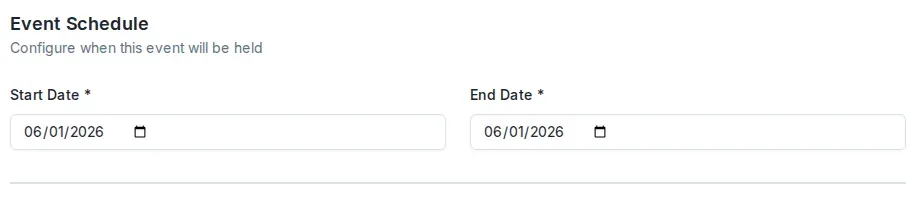
- In the Event Schedule section, set the Start Date and End Date.
- Leave the Event Status field alone — every new event is saved as a draft. Then select Create Event.
What is different from a race event
When you choose Training or Social, Dockside hides the parts of the form that only apply to racing:
- The Competition Setup section does not appear. You do not set a scoring type, a handicap type, or a class list.
- The schedule section is named Event Schedule rather than Race Schedule, and its only fields are the Start Date and End Date. There is no first gun time, races per day, or race days preview, because there is no racing.
Everything else, including naming the event, choosing the organiser, and setting who can register, works the same as for a race event.
Publish the event
Dockside creates the event as a draft. To make it visible to sailors, select Edit Event on the event page, open the Basic tab, set Status to Published, and select Save. See Create an event for the publish step in full.
Update the event's details
Once you have created the event, you will need to update its details. See Event form fields for what every field on the edit screen does.