Your duties
My Duties is where you see the duties your clubs have given you, across all of them at once: confirm you'll be there, ask for cover if you can't, and check what's coming up.
Access. You need to be a member of a club that runs duties. You do not need any officer permission.
See what's coming up
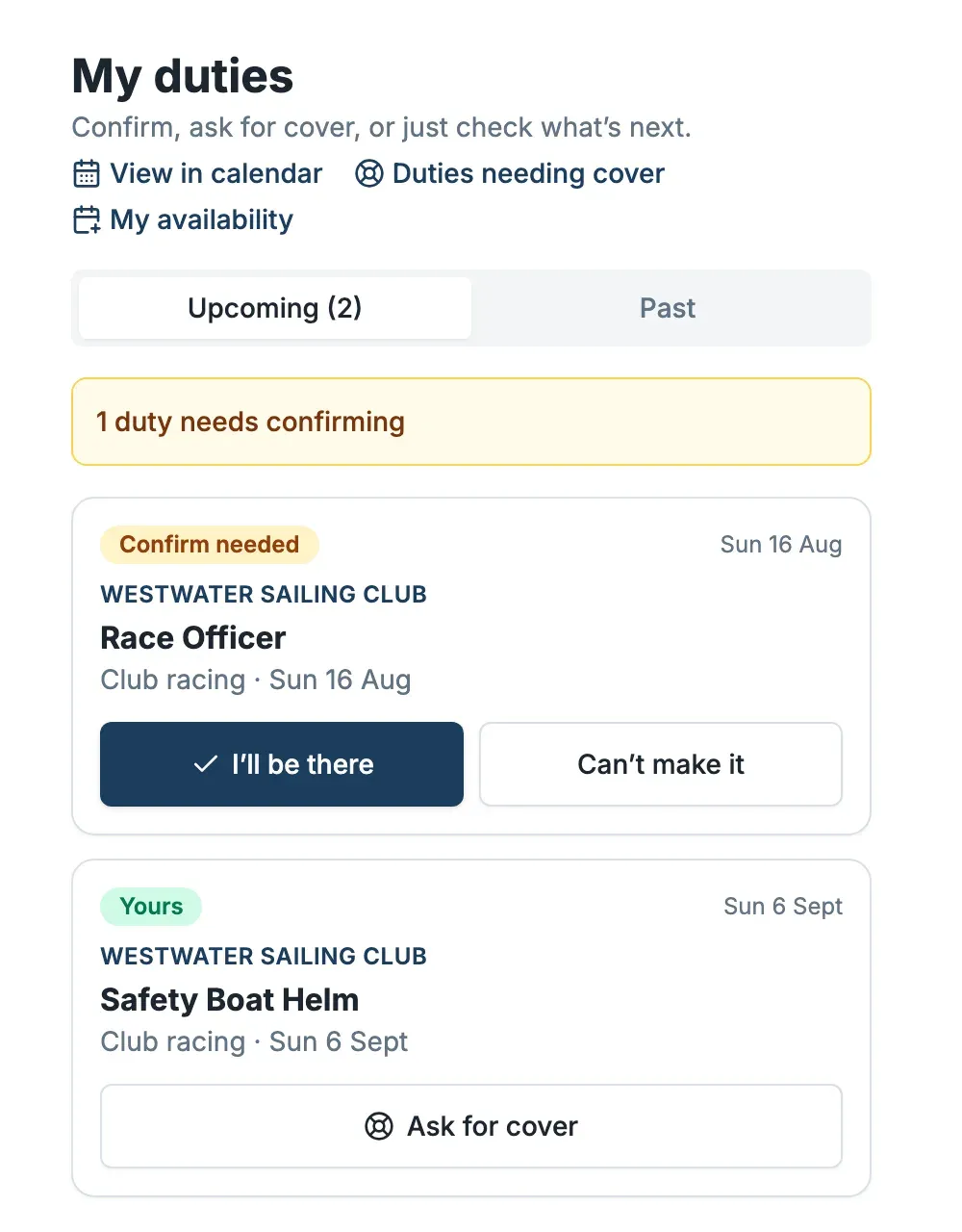
Open My Duties. Your duties are listed under Upcoming, soonest first. Each one shows the club, the role, the date, and where it stands — Confirm needed or Yours. The Past tab keeps a record of the duties you've done.
Confirm a duty
A duty marked Confirm needed is yours, but your club would like to know you're coming. Select I'll be there to confirm it. The banner at the top of the list tells you how many duties are still waiting on you.
Ask for cover
If you cannot make a duty, ask for cover rather than simply not turning up. Select Can't make it on a duty you haven't confirmed, or Ask for cover on one you have. Dockside offers it to other qualified members and lists it under Duties needing cover for them to pick up.
One thing to know: the duty stays yours until someone accepts it. Asking for cover does not take you off the hook — keep an eye on it until it's picked up.
Pick up cover for someone else
Select Duties needing cover to see duties other members have asked cover on. Accept one you're qualified for and it becomes yours.
Get rostered around your life
To be given duties on days that suit you, set your availability — the dates you'd prefer a duty or can't do one. See Set your duty availability.