Roster a period
This article covers how to build a whole stretch of the season in one step with Roster a period, instead of creating one roster at a time. It stamps a duty team across every race day in a period, and can optionally propose who fills each slot for you to review.
Access. You need the Official or Admin permission on the club.
Roster a period is on the club's Season plan, next to Import from Dutyman.
Run it
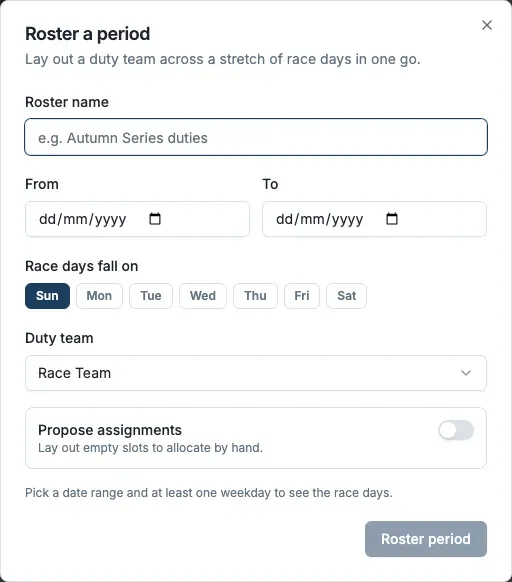
- On the Season plan, select Roster a period. The Roster a period dialog opens.
- In Roster name, name the roster.
- Set the period with From and To, then under Race days fall on, choose the weekdays you race (for example Sun). Dockside previews how many race days that covers.
- In Duty team, pick the team template to stamp across those days.
- Choose whether to turn on Propose assignments. On, Dockside drafts who fills each slot from qualifications, availability and fairness. Off, it lays out empty slots for you to allocate yourself. The starting position follows your club's policy, and you can change it for this run.
- Select Roster period.
Review the draft
Roster a period never publishes. It creates a draft and shows how many slots it laid out, how many it proposed, and how many it left vacant. Select Review draft to open the roster, nudge any slots, and publish when you are ready.
Honest gaps
If no eligible, available member fits a slot (for example no qualified helm), the slot stays vacant rather than being filled with the wrong person. Those gaps flow into the season watch-outs so you can chase them, cover them, or leave them.